![GoTab Logo - White.png]](https://success.gotab.io/hs-fs/hubfs/GoTab%20Logo%20-%20White.png?height=40&name=GoTab%20Logo%20-%20White.png)
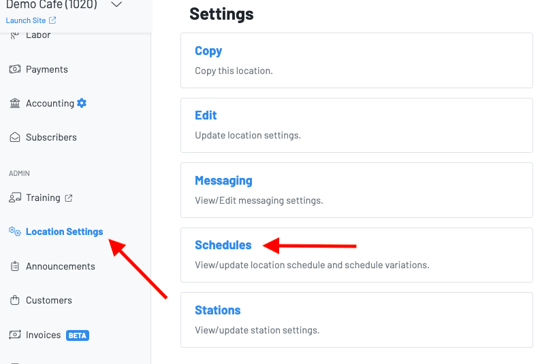
Start by navigating to Location Settings > Schedules
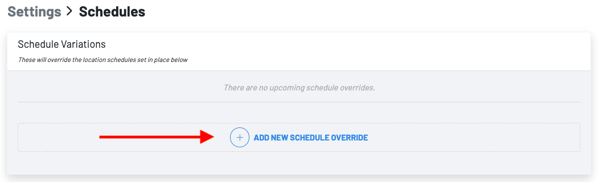
Press +add new Schedule Override
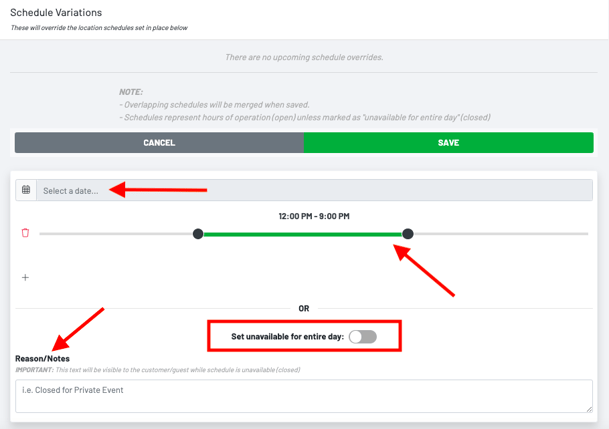
You can create a schedule override to change your hours of operation or set your location as unavailable for the entire day.
Change your hours:
- Choose the day you need to edit your hours of operation
- Drag the time scale to your new hours of operation
- Input a reason
- Press save
Set your location unavailable for the entire day
- Choose the day you will be closed
- Toggle on "set unavailable for the entire day"
- Input a reason
- Press save