![GoTab Logo - White.png]](https://success.gotab.io/hs-fs/hubfs/GoTab%20Logo%20-%20White.png?height=40&name=GoTab%20Logo%20-%20White.png)
Unrestricted Segment
Any user who scans the segment QR or is sent the segment link can join
- To add users:
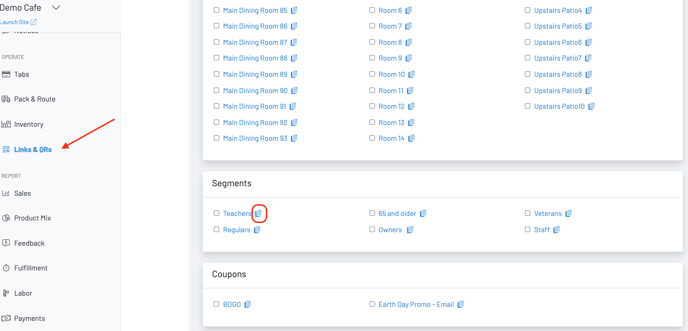
- Click on Links & QRs and scroll to the bottom
- Either print the QR for customers to scan or click the blue copy button next to the segment and embed the link in an email or send via sms
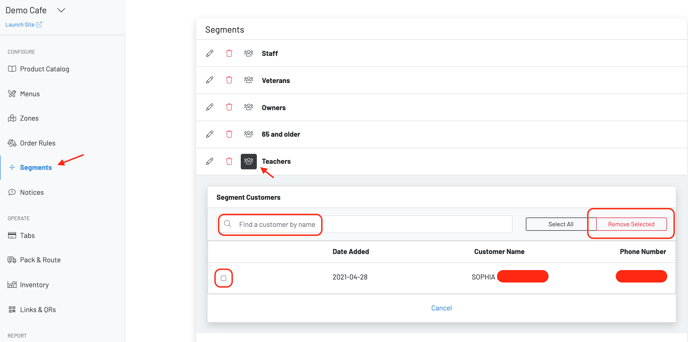
- To remove users, follow the steps below
Restricted Segment
Add a layer of security - only users whose numbers have been associated with the segment will be able to join the group
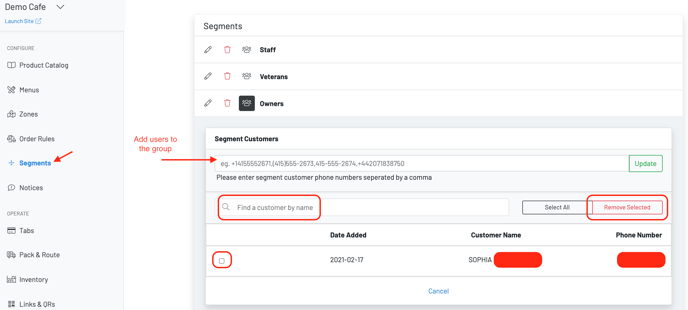
- To add users to the group, enter their phone number
- To remove users, follow the steps below