![GoTab Logo - White.png]](https://success.gotab.io/hs-fs/hubfs/GoTab%20Logo%20-%20White.png?height=40&name=GoTab%20Logo%20-%20White.png)
If your device is asking for a 6 digit activation code, you can quickly grab one from your GoTab Manager Dashboard.
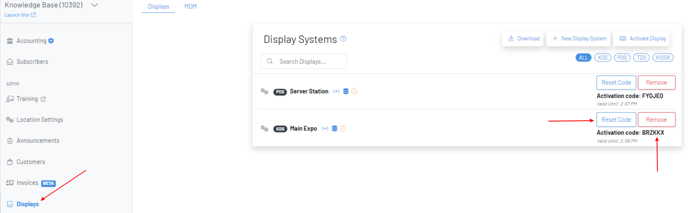
- Navigate to the Display Page on the Manager Dashboard.
- Then, find the device you need an activation code for and press "reset code." This will give you the activation code for that device.
Note: An activation code is valid for 15 minutes. If you miss the 15 minute window, simply press "Reset Code" again for a fresh activation code.
Activating a point of sale as a payment terminal provides you a QR code with an accompanying 4 digit activation code. Click here for an article on activating the GoTab POS app on your POS as a payment terminal.