![GoTab Logo - White.png]](https://success.gotab.io/hs-fs/hubfs/GoTab%20Logo%20-%20White.png?height=40&name=GoTab%20Logo%20-%20White.png)
Guest Associated Coupons Visible Upon Check-In
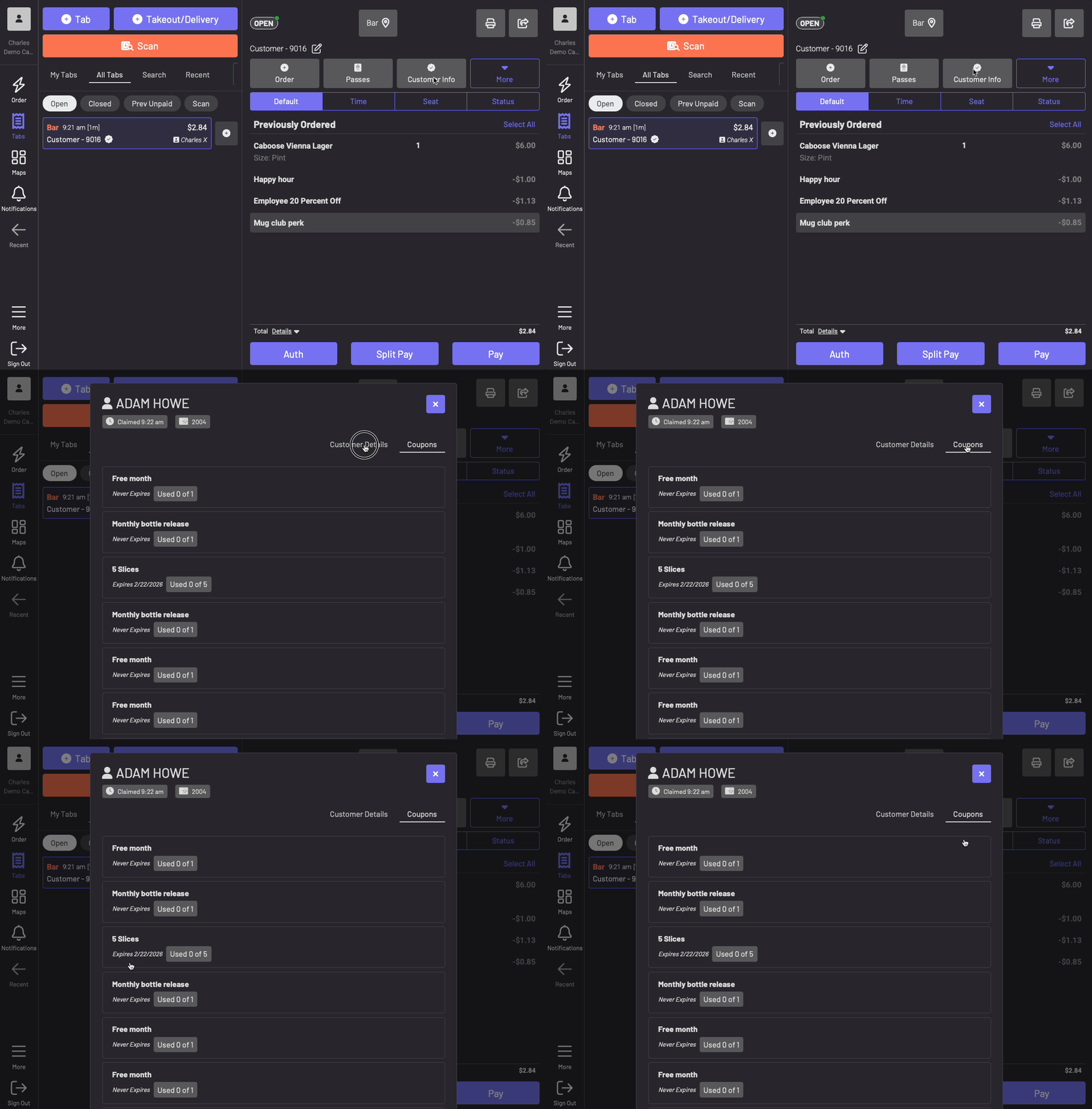
If your guests have claimed a coupon by scanning the associated QR code or clicking the associated URL link or have been issued a coupon through a Loyalty reward or as part of their Membership subscription, their coupons were already visible to them via their GoTab account profile. Now, after checking in at any POS terminal, the guests' coupons will be visible under their Customer Information button. Previously, this button only showed their membership status to loyalty or membership programs at your location. Moving forward, the membership status will still show, along with an added tab to view the coupons associated with the customer's profile and, for those applicable coupons, the number of usages those coupons have left. Checking In allows all applicable coupons to be applied to a claimed tab, not just loyalty and membership-related coupons.
Note: These coupons will still be automatically applied to the guest's tab if the criteria of the coupon are true. If a guest doesn't want to use their coupon(s) they should start a new tab and close it out anonymously, without checking in.
Option Groups Migration Reminder
As a reminder, transitioning to GoTab's upgraded Option Groups functionality (as opposed to the legacy Product Options function) is required to be completed by March 1, 2026. Option Groups allow you to manage and apply a set group of modifiers to multiple products at once, while still allowing you the flexibility of adjusting Option availability, pricing, and requirements based on the associated product. Option Groups also provide you with the ability to tag specific options to trigger Cart Rules based on the Option selected, as well as allow you to schedule gift card purchases from your dedicated Digital Gift Card purchasing page.
Stay Updated
In addition to these product update announcements via your Manager Dashboard, if you'd like to receive direct updates on feature releases, optimization recommendations, and all things related to the GoTab platform, subscribe to the GoTab Newsletter using this link.
If your guests have claimed a coupon by scanning the associated QR code or clicking the associated URL link or have been issued a coupon through a Loyalty reward or as part of their Membership subscription, their coupons were already visible to them via their GoTab account profile. Now, after checking in at any POS terminal, the guests' coupons will be visible under their Customer Information button. Previously, this button only showed their membership status to loyalty or membership programs at your location. Moving forward, the membership status will still show, along with an added tab to view the coupons associated with the customer's profile and, for those applicable coupons, the number of usages those coupons have left. Checking In allows all applicable coupons to be applied to a claimed tab, not just loyalty and membership-related coupons.
Note: These coupons will still be automatically applied to the guest's tab if the criteria of the coupon are true. If a guest doesn't want to use their coupon(s) they should start a new tab and close it out anonymously, without checking in.
Option Groups Migration Reminder
As a reminder, transitioning to GoTab's upgraded Option Groups functionality (as opposed to the legacy Product Options function) is required to be completed by March 1, 2026. Option Groups allow you to manage and apply a set group of modifiers to multiple products at once, while still allowing you the flexibility of adjusting Option availability, pricing, and requirements based on the associated product. Option Groups also provide you with the ability to tag specific options to trigger Cart Rules based on the Option selected, as well as allow you to schedule gift card purchases from your dedicated Digital Gift Card purchasing page.
Stay Updated
In addition to these product update announcements via your Manager Dashboard, if you'd like to receive direct updates on feature releases, optimization recommendations, and all things related to the GoTab platform, subscribe to the GoTab Newsletter using this link.