![GoTab Logo - White.png]](https://success.gotab.io/hs-fs/hubfs/GoTab%20Logo%20-%20White.png?height=40&name=GoTab%20Logo%20-%20White.png)
Product Delays Timer
An upgrade has been pushed out to better serve those who utilize Product Delays from the Products page of your KDS or POS displays. As a reminder, Product Delays allow you to communicate timing expectations for production of certain products or a series of products, both directly to your guests ordering via a self service Kiosk, ordering online for takeout or delivery (1st party orders only), or through guest mobile order flow and to your FOH staff by displaying the delay on the product button of your POS display.
Now, after setting the length of the delay you'd like to display, you will be prompted to select a length of time you'd like the delay to apply. The displayed delay will automatically remove itself after that amount of time has passed. This functionality will be useful in situations where you find your fulfillment station to be overwhelmed, but expect it to catch up within a designated amount of time. Setting the removal of the delay will ensure you will not forget to remove the delay manually. Note, you still retain the ability to remove the delay manually at anytime

Option Groups Migration
As communicated through the customer newsletter (sign up for the newsletter here), the legacy Modifiers management module (aka Product Options) is being retired in lieu of the upgraded Option Groups module being released. This is to serve as a reminder of the need to migrate your product catalog to support the new Option Groups before March 1, 2026. In addition to being easier to apply and manage, Option Groups have also opened up other new features that have been released in the past few months, most notably Option Tagging (giving you the ability to build cart rules that only apply when specific modifiers (options) are selected and the ability to create a dedicated Digital Gift Card E-commerce page, which also allows your guests to schedule gift card purchases to be sent at a future date/time.
As you build out the proper Option Groups for your location, make sure to review each product's current Product Options sets to see which Option Groups it will need. Your location has already been placed in Migration Mode, allowing you to continue to use the Product Options currently set up while building the new Option Groups and applying them to the appropriate products in the background. Once all Option Groups are created and applied accordingly, we will be able to switch your location over to start using the new Option Groups with a quick flip of the switch, making your already set up Option Groups live and retiring your old Product Options without anyone feeling the change.
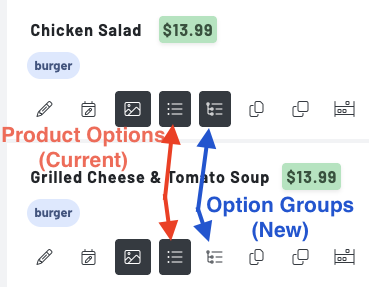
To quickly review your product catalog, look at the icons below each product. Any product that has its Product Options icon highlighted will need new Option Group(s) applied. As you and your Account Manager review your progress, keep an eye on these icons to remind yourself of which products are ready to go and which still need attention, before flipping that final activation switch.